
linux 命令
shell
nginx #启动
nginx -s quit # 优雅停止
nginx -s stop # 立即停止
nginx -s reload # 重载配置文件
nginx -s reopen # 重新打开配置文件
nginx -V # 查看安装目录,配置文件,日志文件等信息
nginx -t # 查看配置文件 常见位置:/etc/nginx/conf
代理
正向代理
是指客户端通过代理服务器发送请求到目标服务器。客户端向代理服务器发送请求,代理服务器再将请求转发给目标服务器,并将服务器的响应返回给客户端。正向代理可以隐藏客户端的真实IP地址,提供匿名访问和访问控制等功能。它常用于跨越防火墙访问互联网、访问被封禁的网站等情况。 
反向代理
是指客户端发送请求到代理服务器,代理服务器再将请求转发给后端的多个服务器中的一个或多个,并将后端服务器的响应返回给客户端。客户端并不直接访问后端服务器,而是通过反向代理服务器来获取服务。反向代理可以实现负载均衡、高可用性和安全性等功能。它常用于网站的高并发访问、保护后端服务器、提供缓存和SSL终止等功能。 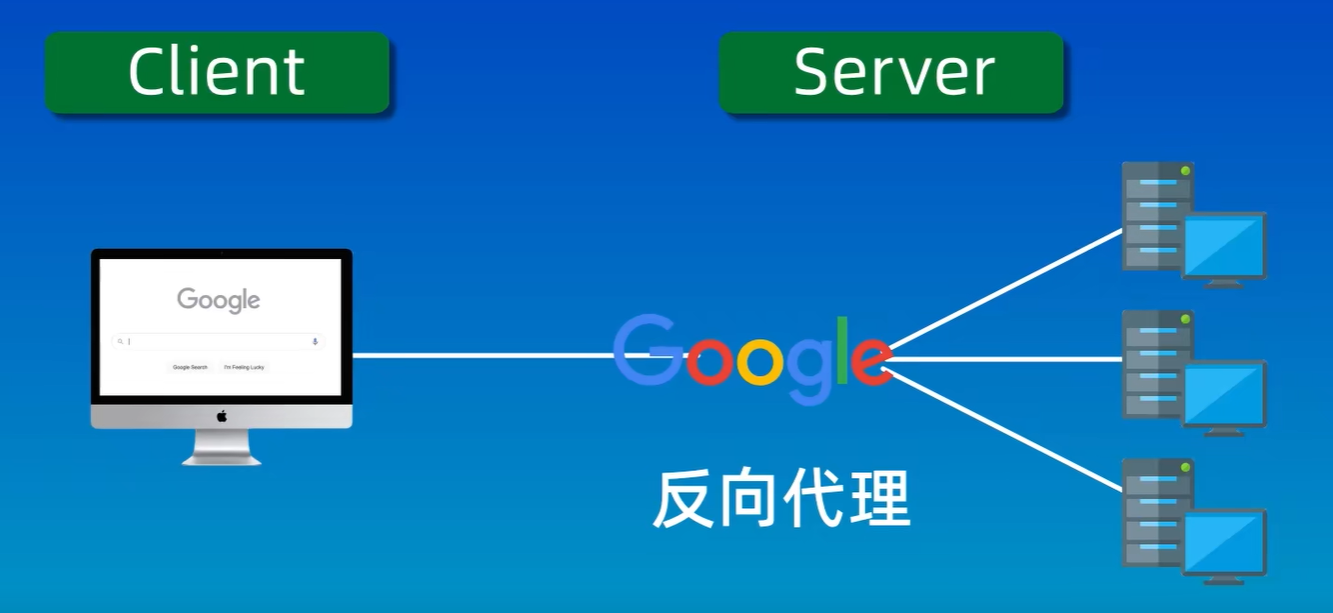
http 跳转到 https
shell
#nginx.conf
server{
  listen: 80;
  server_name: baidu.com www.baidu.com;
  return 301 https://$server_name$request_uri;
}
虚拟主机
每个 server 块就是一个虚拟主机
shell
#nginx.conf
server{
  listen: 80;
  server_name: localhost;
  location / {
    root /www/vue3;
    index index.html index.htm;
    try_files $uri $uri/ /index.html;
  }
}
location 语法
shell
location [ = | ~ | ~* | !~ | !~* | ^~ | @ ] uri {...}

location = / {
    # 精确匹配 /,主机名后面不能带任何字符串
    # http://abc.com [匹配成功]
    # http://abc.com/index [匹配失败]
}

location ^~ /img/ {
    # 以 /img/ 开头的请求,都会匹配上
    # http://abc.com/img/a.jpg [匹配成功]
    # http://abc.com/img/b.mp4 [匹配成功]
}

location ~* /Example/ {
    # 忽略 uri 部分的大小写
    # http://abc.com/test/Example/ [匹配成功]
    # http://abc.com/example/ [匹配成功]
}

location /documents {
    # 如果有正则表达式可以匹配,则优先匹配正则表达式
    # http://abc.com/documentsabc [匹配成功]
}

location / {
    # http://abc.com/abc [匹配成功]
}- =:精确匹配。如果匹配成功,立即停止搜索并处理此请求。
- ~:执行正则匹配,区分大小写。
- ~*:执行正则匹配,不区分大小写。
- !~:正则匹配,区分大小写不匹配。
- !~*:正则匹配,不区分大小写不匹配。
- ^~:前缀匹配。如果匹配成功,不再匹配其他location,且不查询正则表达式。
- @:指定命名的location,主要用于内部重定向请求,如 error_page 和 try_files。
- uri:待匹配的请求字符串。可以是普通字符串或包含正则表达式。 优先级顺序:无特定标识 < ^~ < = < 正则匹配 (~, ~_, !~, !~_)
nginx 配置场景
手动返回内容
nginx
server {
    listen 80;
    server_name example.com;

    # 返回单行文本
    location /hello {
        add_header Content-Type text/plain;
        return 200 "Hello, Nginx!";
    }

    # 返回多行文本(需 echo 模块)
    location /lines {
        add_header Content-Type text/plain;
        echo "Line 1";
        echo "Line 2";
    }

    # 返回 JSON
    location /data {
        add_header Content-Type application/json;
        return 200 '{"code": 200, "data": "OK"}';
    }
}
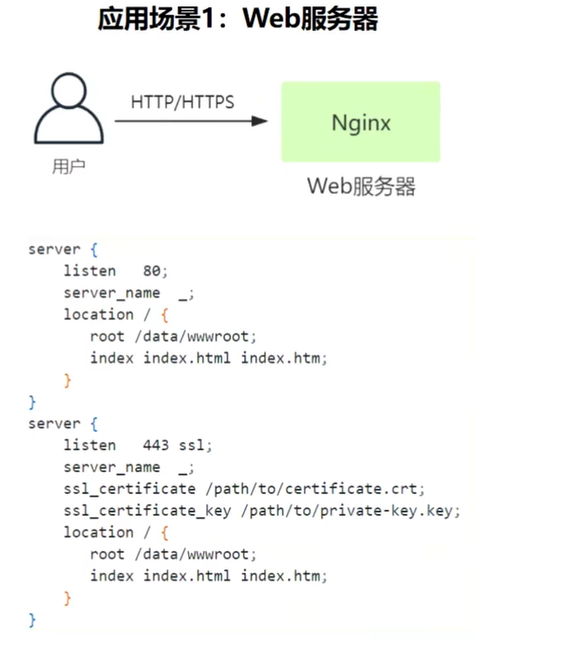
Web 服务器
反向代理服务器
后端服务器不暴露真实的 IP 地址,可以提高安全性 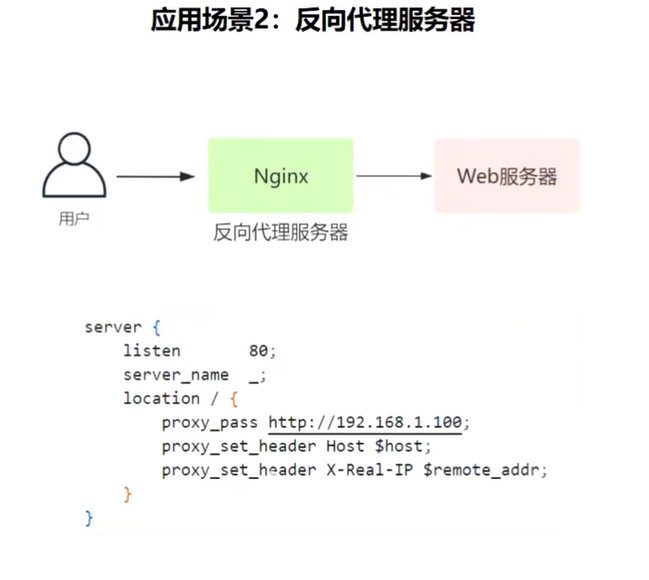
负载均衡器
将流量分发到后端多台服务器的技术,提高程序的高可用和并发能力 
URL 重定向
网站域名改变,需要将老的域名自动跳转到新的域名 
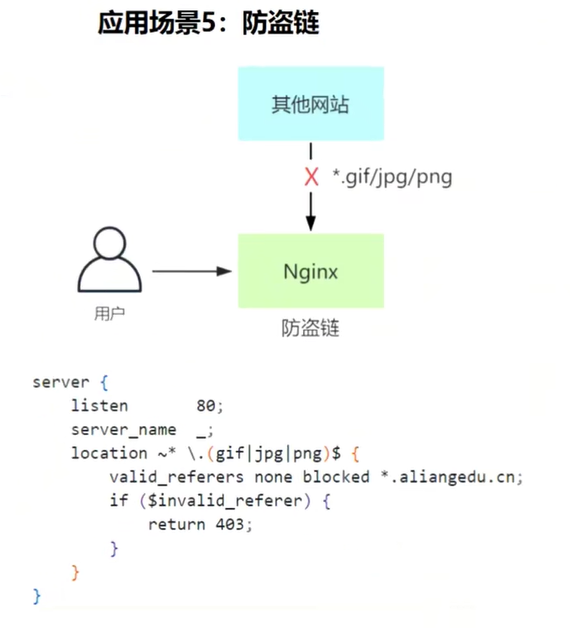
防盗链
手机端重定向到 PC 端
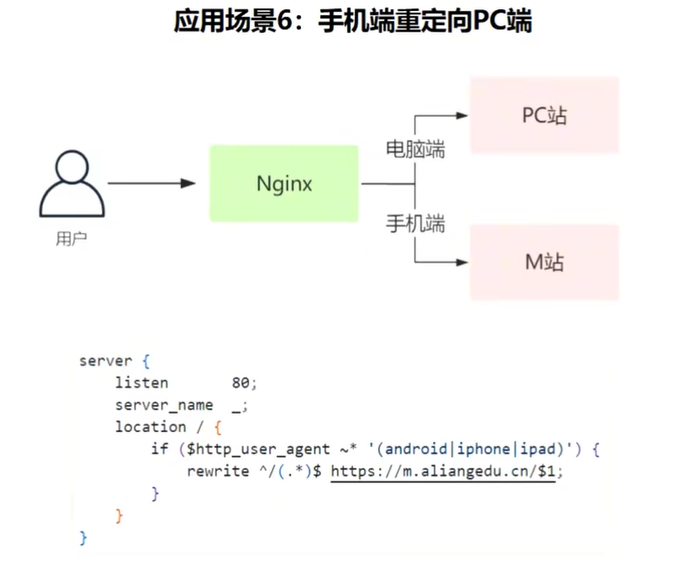
或者
nginx
# 通过 map 映射定义出 $isMobile 变量,可以在下面进行使用
http {
	map $http_user_agent $isMobile {
		default 0; # 默认为 0
		"~*android|iphone|ipad" 1; # 不区分大小写,符合规则则赋值为 1
	}
	server {
		location / {
			root html;
			if ($isMobile) {
				root moblie; # 修改 root 地址,返回 mobile 下的文件
			}
			index index.html index.htm;
	}
	}
}
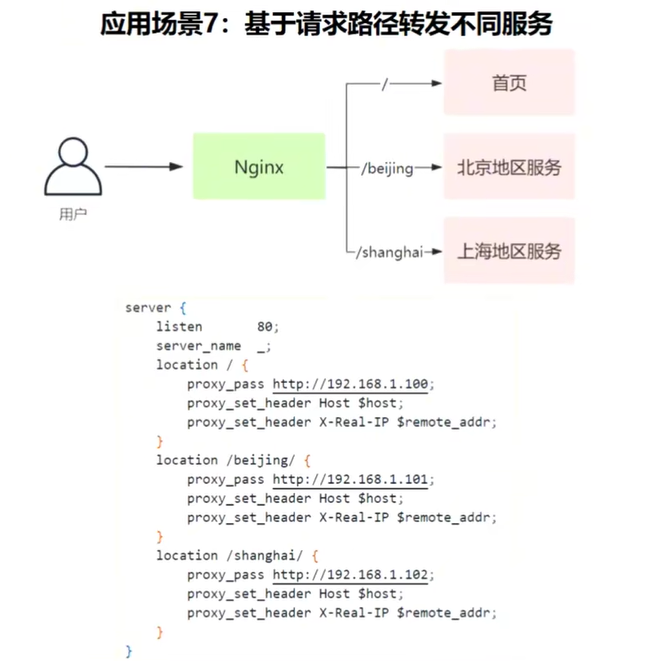
基于请求路径转发不同服务
homebrew
shell
# 更新软件包
brew update
# 安装 install;卸载 uninstall
brew install nginx
# 启动 start;停止 stop;重启 restart;查看服务状态 info;
brew services start nginx
# 查看 homebrew 所有运行中的服务
brew services list
nginx config
nginx
# 设置 content-type
  location /s {
      add_header Content-Type text/html; # 为/api下的响应设置 Content-Type
      try_files $uri $uri/ /index.html =404;
  }

# 返回自定义内容
  location /s {
       add_header Content-Type text/html; # 为/api下的响应设置 Content-Type
       set $escaped_uri  $uri;
       return 200 '<html><head><title>URI</title></head><body><h1>The URI is:</h1><p>$escaped_uri</p></body></html>';
  }